● PRODUCT 01 · WEBSITE PROTECTION

A wordpress SEO firewall that shows you who's touching your site, from where and what they're doing to sabotage it and what countermeasures were taken.

Bots can bombard your WordPress site with made-up links, scan for ways in and eat up server resources. BotExorcist records where those requests came from, which ones were blocked and which real visitors were allowed through.

WordPress plugin · Private demo · Guided trial · Proposed $500 lifetime licence

01 / FIREWALL

What the bots do.

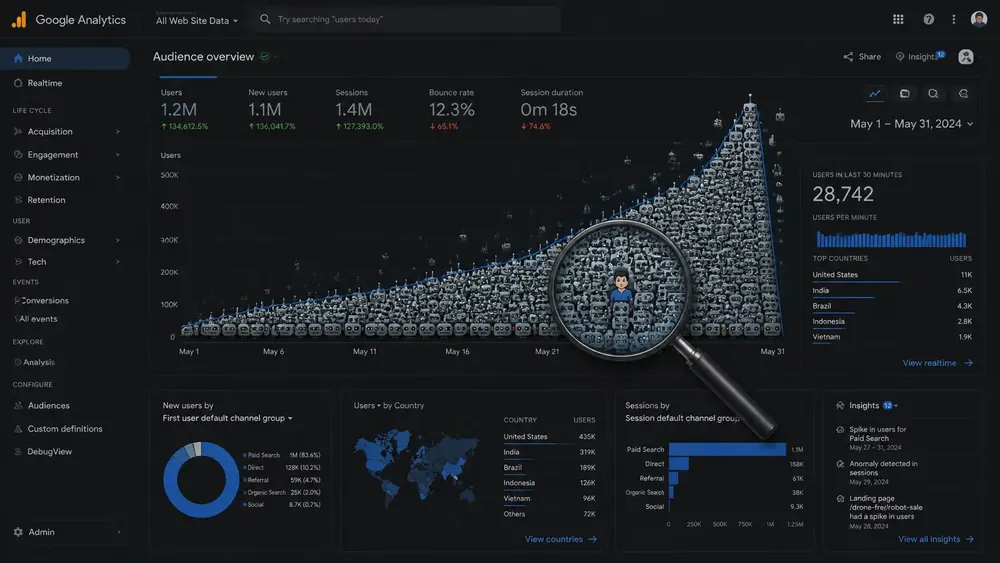
Bots can attack your SEO without breaking into WordPress. They send thousands of requests for fake pages, add junk parameters to your real URLs, and make one-second visits that end without a click or scroll. Those fake visits drag down the dwell-time figures in your analytics. The junk URLs can keep Google busy checking pages you never created, while repeated requests consume the server power needed by real customers and search crawlers. Indexing and search visibility can suffer when crawling is delayed or your real pages become slow or unavailable. BotExorcist records who is doing it, what was requested and which countermeasures were taken.

Fake page requests

Bots repeatedly ask for pages you never created, sometimes deliberately that gets logged with Google that Google then investigates which get logged as 404 pages, which consume crawler resources and ultimately delay existing pages from being indexed, we stop that nonsense in it's tracks.

Read more →

Parameter spam that clogs Google Search Console

Bots add junk parameters to your real page addresses, creating thousands of fake links that can show up in Google Search Console. Google may waste time checking them instead of discovering new pages. BotExorcist identifies and blocks repeated abuse while keeping genuine tracking links working.

Read more →
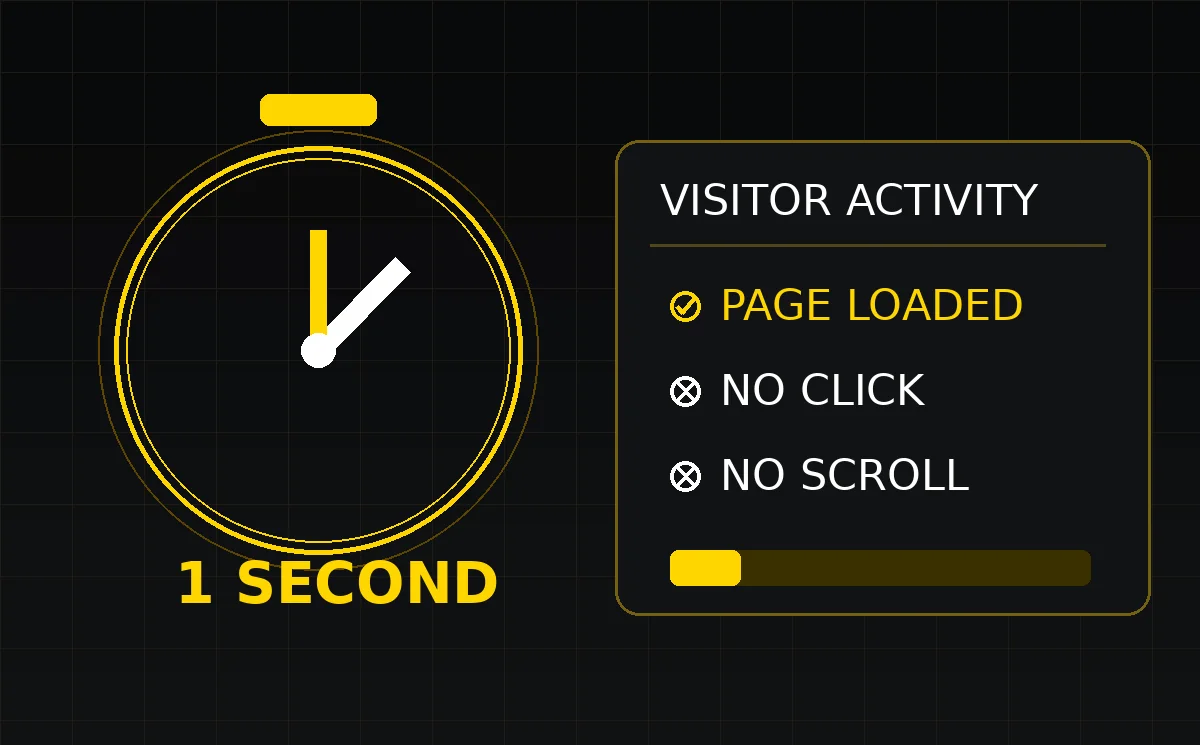
One-second bot visits leaving a page without meaningful interaction

One-second bot bounces that distort dwell time

Bots load a page, stay about one second, and leave without clicking or scrolling. Repeated visits like these drag down your dwell-time reports and hide what real visitors are doing. BotExorcist identifies the pattern, records its source and helps stop repeat offenders.

Read more →

Login pressure

Understand repeated probes against sensitive WordPress entry points.

Read more →
Automated bots continually hammering a website server

Bots hammer the server until pages slow down

Bots request the same pages or hundreds of made-up addresses again and again. That consumes processing power your real customers and Google need. If the server keeps slowing down or failing, Google may reduce crawling and people may give up before buying. BotExorcist identifies repeated hammering and blocks the source.

Read more →
Real search crawler separated from impostors

Fake Googlebots and crawler impersonators

Some bots put Googlebot in their name and hope you trust them. They can scrape your site or probe for weaknesses while pretending to be a search engine. BotExorcist checks the network behind the claim and keeps verified search crawlers out of the firing line.

Read more →
Illustrated explainer: A WordPress SEO firewall that shows its work.
Tap or click the illustration to open it at full size. Product diagrams are illustrative.
02 / FIREWALL

Why stopping the wrong visitor matters.

A flood of junk requests can slow your website or make it temporarily unavailable to paying customers. Google may also crawl less if your server keeps struggling. We protect the resources your customers and real search crawlers need, and our pros check that genuine visitors, forms and Googlebot still work.

03 / FIREWALL

We handle setup and calibration.

Switch on protection with help from our team. We check the settings against your real visitors, forms, WordPress admin and search crawlers. You can also choose Observation Mode to see a record of suspicious requests before enforcement.

THE COUNTERMEASURES

Here is exactly how BotExorcist fights back.

Bots waste your server power, fill reports with nonsense and hide what real customers are doing. We expose the activity, preserve the evidence and apply the right protection. Our pros handle setup and calibration.

BotExorcist original Gotcha Bitch honeypot illustration

Honeytraps: fake bait catches fake visitors

We plant traps that ordinary customers never need to touch. A bot that goes for the bait exposes automated behaviour. We record the trap, time, IP and requested route, then use that evidence to justify further investigation or a block.

See how it works →
One-second no-interaction visit caught in a traffic report

One-second bounce gate

Bots arrive and disappear without clicking, scrolling or visiting a second page. BotExorcist records those low-signal visits and watches for repeat patterns within a configured time window. A single quick visit is not proof of a bot.

See how it works →
IP address and network intelligence

IP bans: stop the repeat offender

When an address repeatedly attacks your site, BotExorcist can block that IP so it stops consuming resources. Your administrator and approved visitors stay on the allowlist.

See how it works →
Network activity monitored in the BotExorcist War Room

ASN and network-range controls

A bot can change IP addresses but keep using the same network. BotExorcist helps connect those attacks to the network behind them. Our pros only block wider ranges when the evidence supports it, to avoid hurting ordinary visitors.

See how it works →
Cluttered URLs and search crawling overload

Junk URL and parameter filters

Bots tack random junk onto your real URLs, or ask for pages you never created. BotExorcist can stop repeated fake requests before they keep hammering the server, while legitimate campaign links keep working.

See how it works →
Crawler verification checks

Fake Googlebot detection

Calling yourself Googlebot does not make you Google. BotExorcist checks the identity behind a crawler request so fake crawlers can be challenged without blocking the real search engines.

See how it works →
Protected WordPress login gateway

Login and sensitive-route defence

Attack bots repeatedly knock on login pages and secret-looking paths. BotExorcist records those attempts, scores repeat offenders and uses configured protections to shut down abuse without locking out legitimate administrators.

See how it works →
Evidence-based network abuse investigation

AI-assisted abuse reports

When repeat abuse is documented, the AI tools can help turn the evidence into a clear complaint addressed to the responsible hosting or network provider. Where automatic sending is configured, the system can send the report; the evidence remains available for review.

See how it works →
BotExorcist live security evidence records

Evidence Ledger: keep the receipts

For each relevant incident, BotExorcist can preserve when it happened, the requested URL, source IP, network and ASN, suspicious behaviour, scores and action taken. Those records explain what happened instead of asking you to guess.

See how it works →
Investigation of ad clicks and bot traffic

PPC Integrity: investigate billed clicks

A paid click might be a customer, an accident or a bot. BotExorcist connects the click marker to what happened after arrival, such as time on page, scrolling and clicks, then builds evidence you can use to challenge suspicious traffic.

See how it works →
Professional WordPress firewall calibration

Human-safe calibration by our pros

You do not need to babysit the firewall. Our pros configure the trusted IPs, WordPress forms, verified crawlers and normal traffic before or during activation, so customers can use your website while bots are stopped.

See how it works →
Documentation and evidence report

Reporting and export tools

See which requests were blocked, when, from which IP or network, and why. Export supported reports or evidence packs for your own records, support cases and advertising disputes.

See how it works →
LIVE EVIDENCE

See where the pressure comes from and what it’s doing.

BotExorcist doesn’t just block suspicious traffic. It shows you where it’s coming from, what behaviour was detected, how it was scored, and what action was taken. That means less guesswork, more evidence, and better decisions.

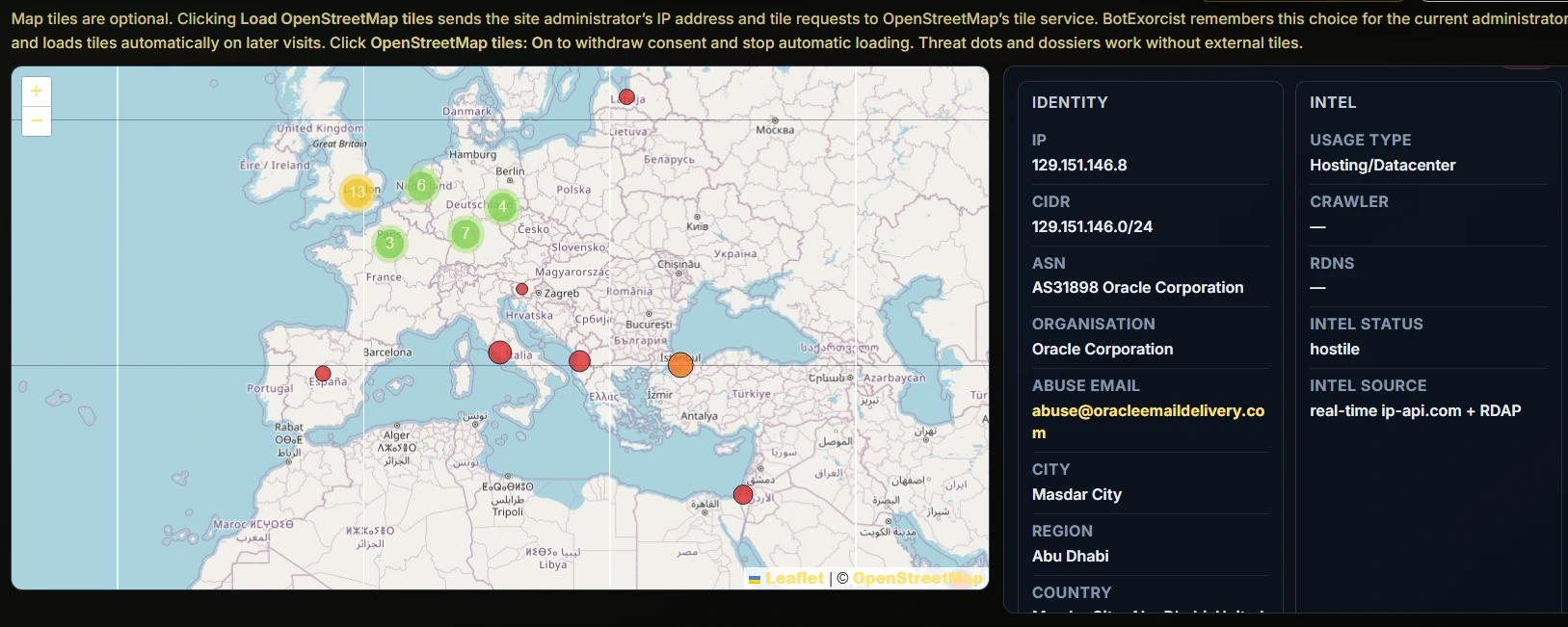
Attack-location mapping

See suspicious traffic plotted geographically, including clustered activity, hostile networks, and repeated pressure from data centre and hosting ranges. It gives you a visual view of where attacks are originating and how widely distributed they are.

Attack-location mapping showing observed network locations on a geographic map
Actual BotExorcist attack-location map showing plotted network activity.

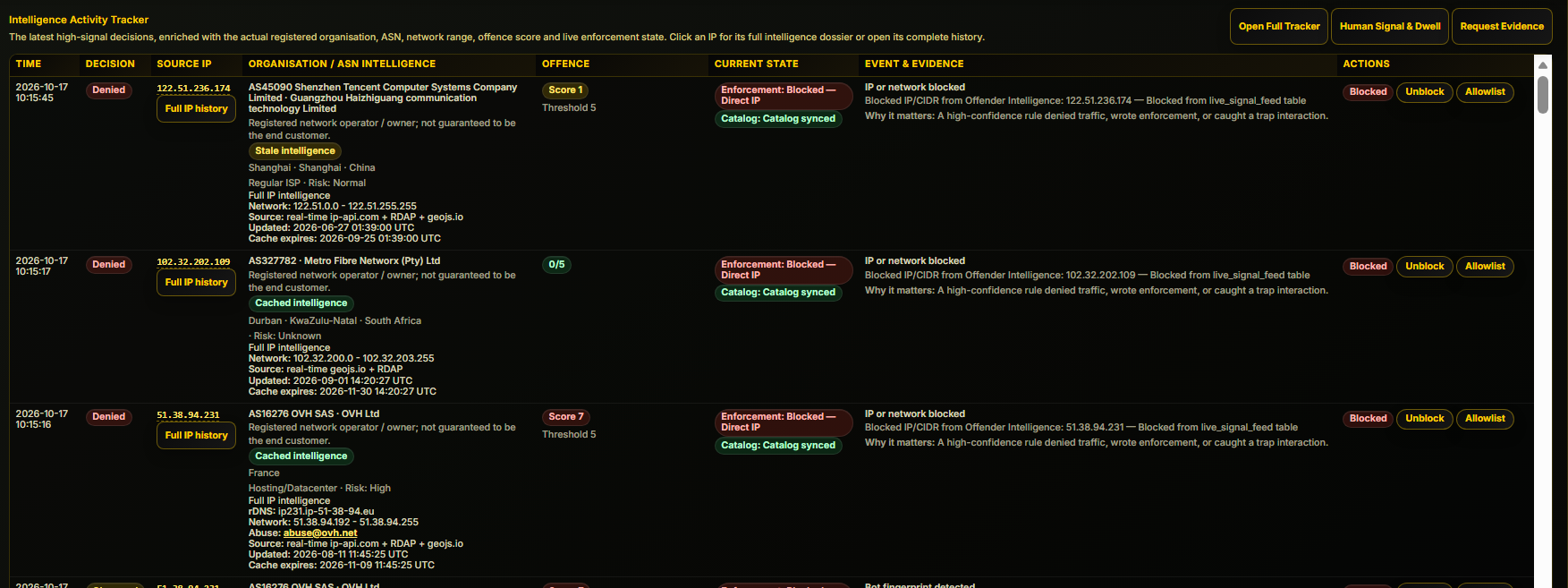
Intelligence activity tracker

Every high-signal event is logged with its source IP, organisation, ASN (Autonomous System Number), offence score, evidence, and enforcement state. This turns isolated requests into a usable intelligence trail, so you can investigate patterns, justify blocks, and act with confidence with abuse reporting submitted by AI to the offending networks on auto to either get them banned as customers, to take legal action or to put them on notice.

Intelligence Activity Tracker showing organisation, ASN, offence scores, evidence and enforcement state
Actual BotExorcist intelligence tracker. See the network evidence, offence score and action history.

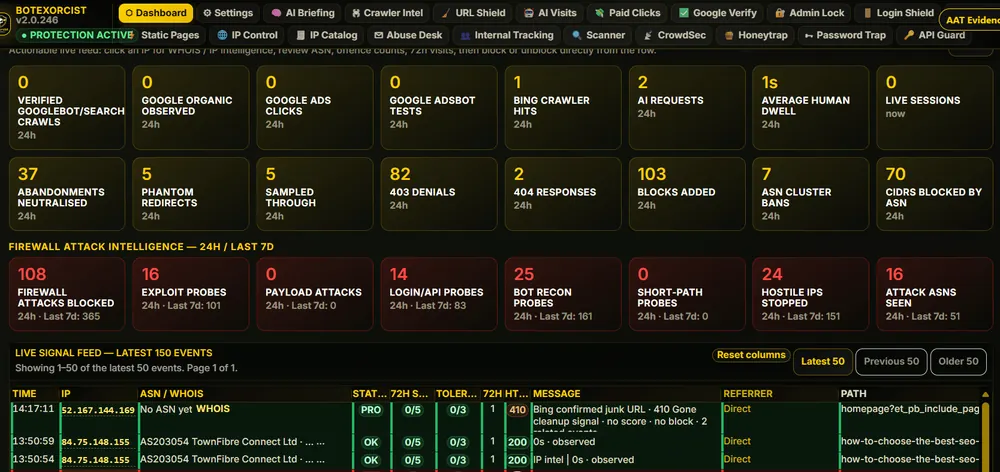
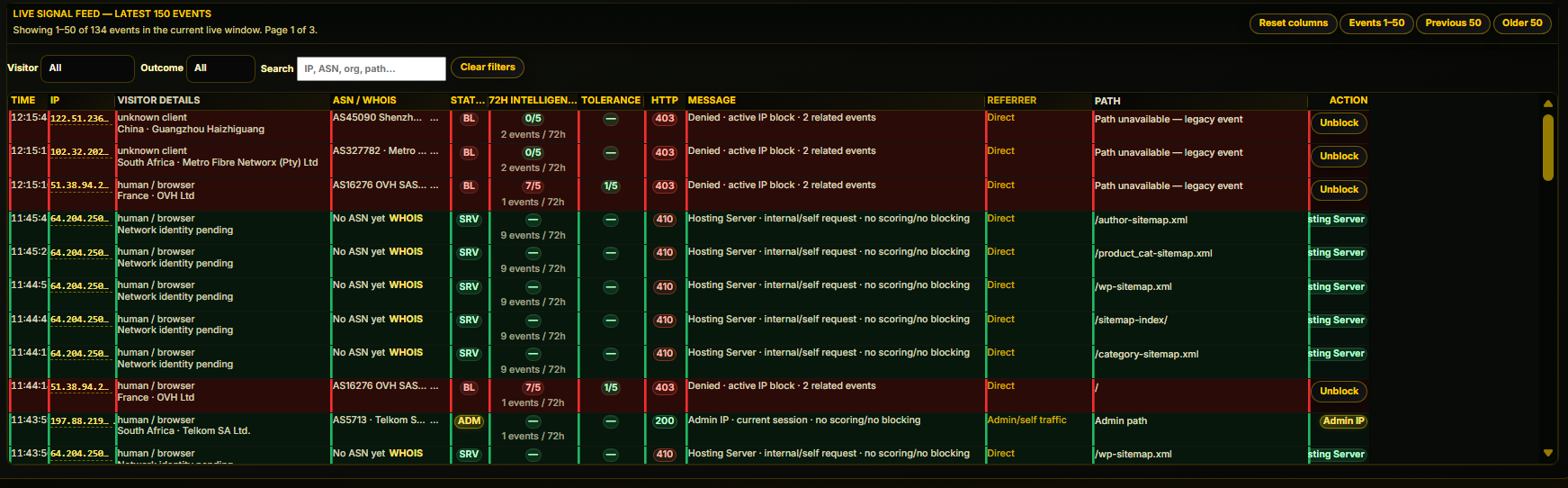
Live Signal Feed

Individual events show the time, source, network intelligence, response and recorded action in one view.

BotExorcist Live Signal Feed with time, IP, ASN, HTTP outcome and recorded action
Actual BotExorcist Live Signal Feed screenshot.
ABUSE DESK

Automatic report submission and complaint system

BotExorcist doesn't just block attackers. It goes after the networks responsible.

When suspicious bots attack your website, BotExorcist identifies their behaviour, records the evidence, traces the source IP addresses and identifies the networks responsible through their ASN (Autonomous System Number - in otherwords a datacenter or network).

With automtic abuse reporting enabled, complaints are submitted to those networks without requiring you to investigate and write reports - It's automatic, you receive their responses in a designated email account.

If the activity continues, subsequent complaints escalate, putting the networks on formal notice and creating a documented trail that may support further action.

Blocking an attacker protects your website. Reporting the attacker puts pressure on the infrastructure enabling the attack.

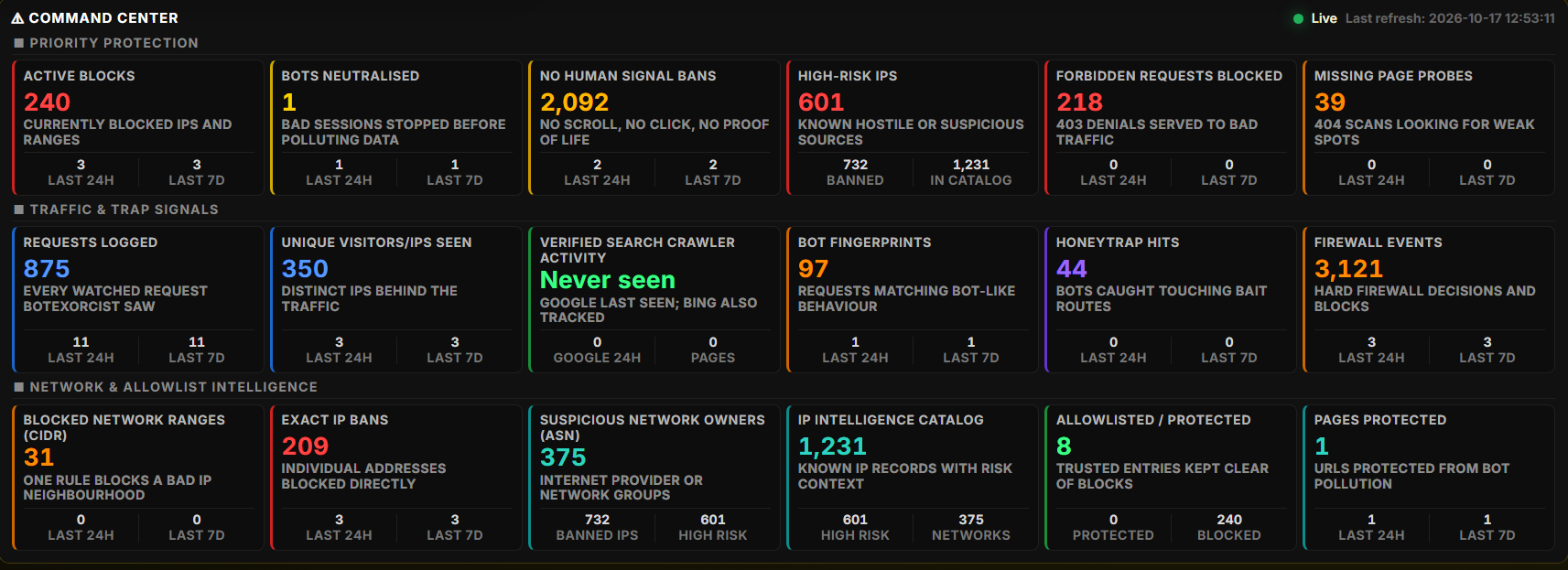
COMMAND CENTER

Threat and traffic overview

Security and traffic evidence in one dashboard, including block counts, no-human-signal activity, crawler verification and network intelligence.

Actual BotExorcist Command Center counters for blocking, traffic quality and network intelligence
Actual BotExorcist Command Center screenshot. The figures represent the dashboard at the time of capture, not the seven-day briefing below.
REAL-WORLD CASE STUDY · 168-HOUR REPORT

BotExorcist Threat & SEO Integrity Briefing

Lexcon Prime Signal Automations · 10–17 October 2026 · Low overall threat level

This is a dated monitoring report, not live telemetry. The figures below come from the selected 168-hour evidence window.

11Requests reviewed
3Unique IPs
8410 Gone cleanups
3Block rules created
12Activity events

AI status: Automated fallback report generated. AI enrichment was unavailable at generation time due to provider timeout. Core evidence capture and reporting continued normally.

Important distinction: The eight HTTP 410 responses were SEO cleanup signals, not crawler blocks. The report recorded zero 403 denials and zero 404 responses.

Read the complete 13-section threat and SEO integrity briefing

BotExorcist Threat & SEO Integrity Briefing

Website: Lexcon Prime Signal Automations (https://lexconprimesignal.com/)

Window: last 168 hours, since 2026-10-10 10:25:02 UTC

Generated: 2026-10-17 10:25:02 UTC

AI status: Automated fallback report generated. AI enrichment was unavailable at generation time due to provider timeout. Core evidence capture and reporting continued normally.

1. Executive Summary

During the selected 168-hour monitoring window, BotExorcist reviewed 11 request records from 3 unique IP addresses.

The system identified automated probing, scanner behaviour, login/XML-RPC activity, PHP/file probe attempts, no-signal sessions, and SEO cleanup events where supported by the evidence.

BotExorcist recorded 0 denied 403 responses, 0 not-found 404 responses, 8 410 Gone cleanup responses, 3 block rules created, and 12 activity events preserved.

The 410 Gone responses are not crawler blocks. They are cleanup signals used to tell search engines that junk, poisoned, outdated, or non-existent URLs should be removed from their index.

2. Threat Level

  • Overall Threat Level: Low
  • Primary Concern: No-signal sessions and traffic-quality noise
  • SEO Risk: Low to Moderate
  • Crawler Safety: Protected
  • Recommended Action: Continue monitoring and preserve evidence for trend analysis.

3. Key Metrics

  • Request records reviewed: 11
  • Unique IP addresses: 3
  • Denied 403 responses: 0
  • 404 responses: 0
  • 410 Gone cleanup responses: 8
  • Block rules created: 3
  • Activity events: 12
  • Redirect anomalies: 0
  • No-signal events: 1
  • Verified search-engine cleanup confirmations: 0

4. Attack Pattern Intelligence

Traffic Quality Issues:

  • No-signal / non-human sessions: 1 event(s). Sessions with no scroll, click, heartbeat, or meaningful dwell can dilute analytics and make traffic quality look worse than it is.

SEO Cleanup Activity:

  • SEO cleanup 410 Gone responses: 8 event(s). 410 Gone tells crawlers a junk, poisoned, outdated, or non-existent URL should be removed from the index. This is cleanup, not a crawler block.

5. Protection Actions Taken

  • Logged and scored suspicious request behaviour.
  • Denied high-risk requests with 403 responses where appropriate.
  • Issued 410 Gone responses for junk or invalid cleanup URLs.
  • Preserved IP, ASN, organisation, and location evidence for investigation and reporting.
  • Separated verified crawler activity from hostile traffic assumptions.
  • Created 3 block rule(s) from qualifying evidence.
  • Maintained activity history for investigation, reporting, and future abuse escalation.

6. What This Means for SEO

  • Bot traffic can distort analytics, inflate bounce/no-signal patterns, waste crawl budget, and make it harder to separate real visitors from automated noise.
  • 410 Gone cleanup responses help search engines remove junk, poisoned, outdated, or non-existent URLs from their index.
  • Verified Google/Bing cleanup hits should be treated as SEO cleanup confirmations, not crawler blocks or punishments.
  • Cleaner logs and cleaner indexes make SEO troubleshooting more reliable because the site owner can distinguish real engagement from automated noise.

7. SEO Cleanup and 410 Gone Signals

A 410 Gone response is an SEO cleanup signal. It tells search engines that a junk, poisoned, outdated, or non-existent URL should be removed from the index.

For verified search-engine crawlers, this is not a block. It is BotExorcist helping Google and Bing clean their records while keeping verified crawlers protected, unscored, and separated from threat rollups.

8. Crawler Safety Notes

  • Verified Google/Bing crawler traffic should remain protected, unscored, and separated from threat rollups.

9. Top Networks, ASNs and IP Patterns

Top ASNs: AS5713 (1), AS16276 OVH SAS (1)

Top organisations: Telkom SA Ltd. (1), OVH Ltd (1)

Top IPs: 64.204.250.80 (9), 197.88.219.36 (1), 51.38.94.231 (1)

10. Redirect Integrity Notes

  • Redirect inventory total: 0
  • Active/unspecified inventory: 0
  • Redirect anomalies detected: 0
  • Redirect Integrity should allow active redirect inventory and classify unknown same-site redirects before blocking, while staying strict on unknown external or suspicious redirects.

11. Recommended Actions

  • Review the top ASNs and IP addresses if they repeatedly trigger 403, 404, 410, no-signal, login, or probe-path evidence.
  • Keep verified Google and Bing crawler traffic protected and unscored.
  • Treat 410 Gone responses as SEO cleanup intelligence, not crawler blocks.
  • Keep Redirect Integrity in safe same-site mode for normal client websites.
  • Reserve strict redirect mode for controlled environments or high-confidence redirect abuse.
  • Use Abuse Desk and XLSX/PDF evidence packs for repeated high-confidence network abuse.
  • Continue monitoring no-signal traffic because it may affect analytics quality, lead attribution, PPC interpretation, and SEO troubleshooting.

12. Client-Friendly Summary

Your website was monitored for automated and suspicious traffic patterns over the selected evidence window. BotExorcist identified scanner activity, login probing, PHP/file probe attempts, no-signal sessions, and SEO cleanup events where the evidence supported those findings.

It separated search-engine cleanup activity from real threats and preserved evidence showing which IPs, networks, ASNs, and organisations were involved.

The system helped protect the site, reduce noise, preserve forensic evidence, and support cleaner SEO and traffic analysis.

13. Plain-English Takeaway

BotExorcist does not simply block traffic blindly. It watches what visitors, bots, scanners, crawlers, and cloud-hosted probes actually do, records the behaviour, separates real search-engine activity from hostile automation, and gives the website owner evidence they can understand and act on.

The result is a cleaner website, cleaner logs, cleaner SEO data, and better visibility into who is really touching the site.


Image enlarged to 125%
PRIVATE, PRACTICAL AND VERIFIABLE

Book a demo. We handle the technical side.

See BotExorcist on your own WordPress site. Our pros handle setup and calibration, then you decide if it earns a permanent place.

Book a private demonstration ↗